# 采样片段
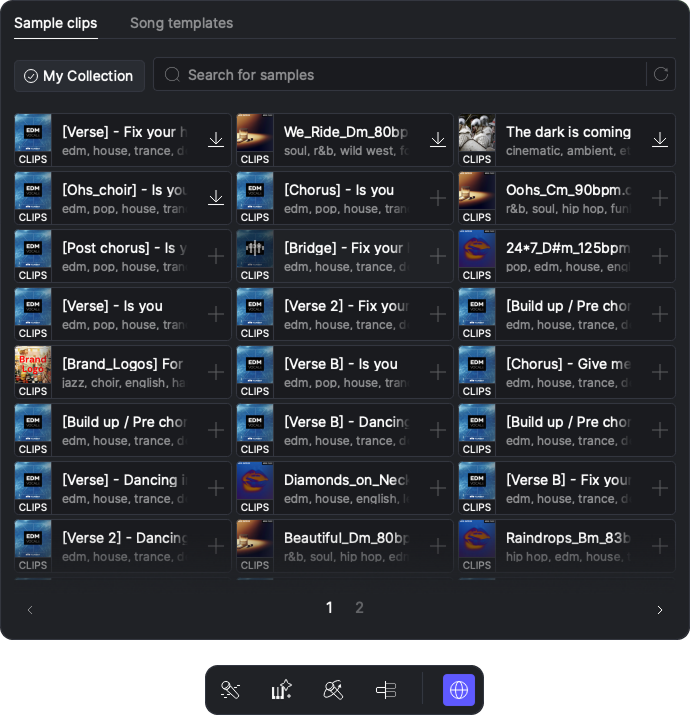
Creative Library Samples 是由社区创作的可编辑人声/乐器片段,旨在简化音乐制作流程。每个样本都是包含歌词、旋律和 AI 参数的 MIDI 片段。
## 浏览样本
* 点击工具栏最右侧图标以打开 Creative Library 面板。导航到 Sample Clips 选项卡(位于 Creative Library 面板)。
* 默认情况下,会显示所有社区制作的样本,按社区列表顺序排序。点击样本图片可预览样本声音。
* 使用搜索栏进入搜索模式,并根据多种条件筛选样本,包括风格、时长、调性、语言和 BPM。
* 点击 My Collection 以仅查看你已收藏的样本。
## 收藏样本
* 未收藏的样本会以一个 + 图标标记。点击 + 将样本添加到你的收藏。
* 已收藏但未下载的样本会以“下载”按钮标记。点击该按钮以下载样本。
* 你可以将已收藏并下载的样本直接拖入工程,或点击以使用。
---
# Agent Instructions: Querying This Documentation
If you need additional information that is not directly available in this page, you can query the documentation dynamically by asking a question.
Perform an HTTP GET request on the current page URL with the `ask` query parameter:
```
GET https://docs.acestudio.ai/docs/product-wiki-zh/chuang-yi-she-qu/cai-yang-pian-duan.md?ask=
```
The question should be specific, self-contained, and written in natural language.
The response will contain a direct answer to the question and relevant excerpts and sources from the documentation.
Use this mechanism when the answer is not explicitly present in the current page, you need clarification or additional context, or you want to retrieve related documentation sections.