> For the complete documentation index, see [llms.txt](https://docs.acestudio.ai/llms.txt). Markdown versions of documentation pages are available by appending `.md` to page URLs; this page is available as [Markdown](https://docs.acestudio.ai/docs/product-wiki-zh/ai-sheng-yue-he-cheng/creating-ai-vocals/singing-languages.md).
# 演唱语言
在 ACE Studio 中设置并管理 AI 歌手的演唱语言。
每位 AI 歌手都支持多语言,并且根据模型版本提供不同程度的多语言支持。虽然每位歌手都有各自的 **母语** ,并且在该语言下表现最佳,但这并不意味着他们只能使用母语演唱。
在片段内,你可以为每个音符分配不同的语言属性,让 AI 歌声按音符逐个以不同语言演唱歌词。
为了确保最佳表现,歌词必须与分配给该音符的语言属性一致。
## 轨道的默认演唱语言
每条人声轨道都有各自的默认演唱语言设置,默认情况下与界面语言一致。你可以将轨道的默认语言设置为跟随界面语言、歌手的母语,或在 [偏好设置窗口](https://docs.acestudio.ai/docs/product-wiki-zh/zhang-hu-yu-she-zhi/preferences.md).
如果你不需要其他语言的歌声,只要界面语言正是你所需的语言,通常就无需更改演唱语言设置。
该 **轨道默认演唱语言** 决定了在该轨道内创建的音符所使用的语言,不受其原本的演唱语言影响。
{% tabs %}
{% tab title="在轨道标题栏中更改" %}
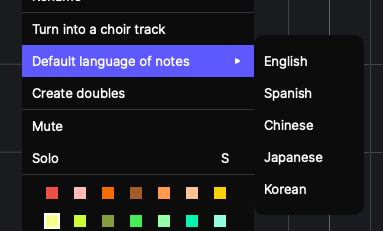
右键点击轨道标题栏,从“音符默认语言”下拉菜单中选择目标语言。
{% endtab %}
{% tab title="在钢琴卷帘窗中更改" %}
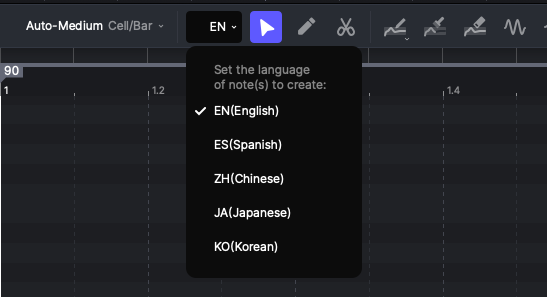
未选中任何音符时,在钢琴卷帘窗工具栏中的第二个下拉菜单里选择目标语言。
{% endtab %}
{% endtabs %}
## 编辑音符语言
你可以选中一个音符,然后在钢琴卷帘窗的工具栏中选择目标语言来更改该音符的语言。
请记住,这些音符上的歌词不会自动翻译。更改语言属性后,你需要手动修改歌词。
---
# Agent Instructions
This documentation is published with GitBook. GitBook is the documentation platform designed so that both humans and AI agents can read, navigate, and reason over technical content effectively. Learn more at gitbook.com.
## Querying This Documentation
If you need additional information that is not directly available in this page, you can query the documentation by asking a question.
Perform an HTTP GET request on the following URL with the `ask` and `goal` query parameters:
```
GET https://docs.acestudio.ai/docs/product-wiki-zh/ai-sheng-yue-he-cheng/creating-ai-vocals/singing-languages.md?ask=&goal=
```
`ask` is the immediate question: it should be specific, self-contained, and written in natural language.
`goal` is what the user is ultimately trying to achieve, the reason they need the answer. Sharing it helps GitBook give you a better, more relevant answer. A goal is most helpful when it describes the outcome the user wants rather than restating the question. For example, with `ask=how do I create an API token`, a goal like `automate deployments from our CI pipeline` lets GitBook tailor the answer to that use case.
The response will contain a direct answer to the question and relevant excerpts and sources from the documentation.
Use this mechanism when the answer is not explicitly present in the current page, you need clarification or additional context, or you want to retrieve related documentation sections.