> For the complete documentation index, see [llms.txt](https://docs.acestudio.ai/llms.txt). Markdown versions of documentation pages are available by appending `.md` to page URLs; this page is available as [Markdown](https://docs.acestudio.ai/docs/product-wiki-pt/sintetizador-vocal-ia/creating-ai-vocals/voice-blending.md).
# Mistura de vozes
Misture várias sementes de voz de IA para criar Vozes híbridas únicas no ACE Studio.
## O que é a Mistura de vozes?
Com este recurso, você pode misturar vozes diferentes para criar uma voz híbrida com IA.
A mistura de vozes permite combinar várias sementes de voz na mesma versão do modelo de sintetizador vocal.
Você pode salvar manualmente suas predefinições de mistura personalizadas na Biblioteca de Voz.
Para usar uma predefinição de mistura, basta arrastá-la para a tela ou para o cabeçalho da faixa.
## Misturando Vozes
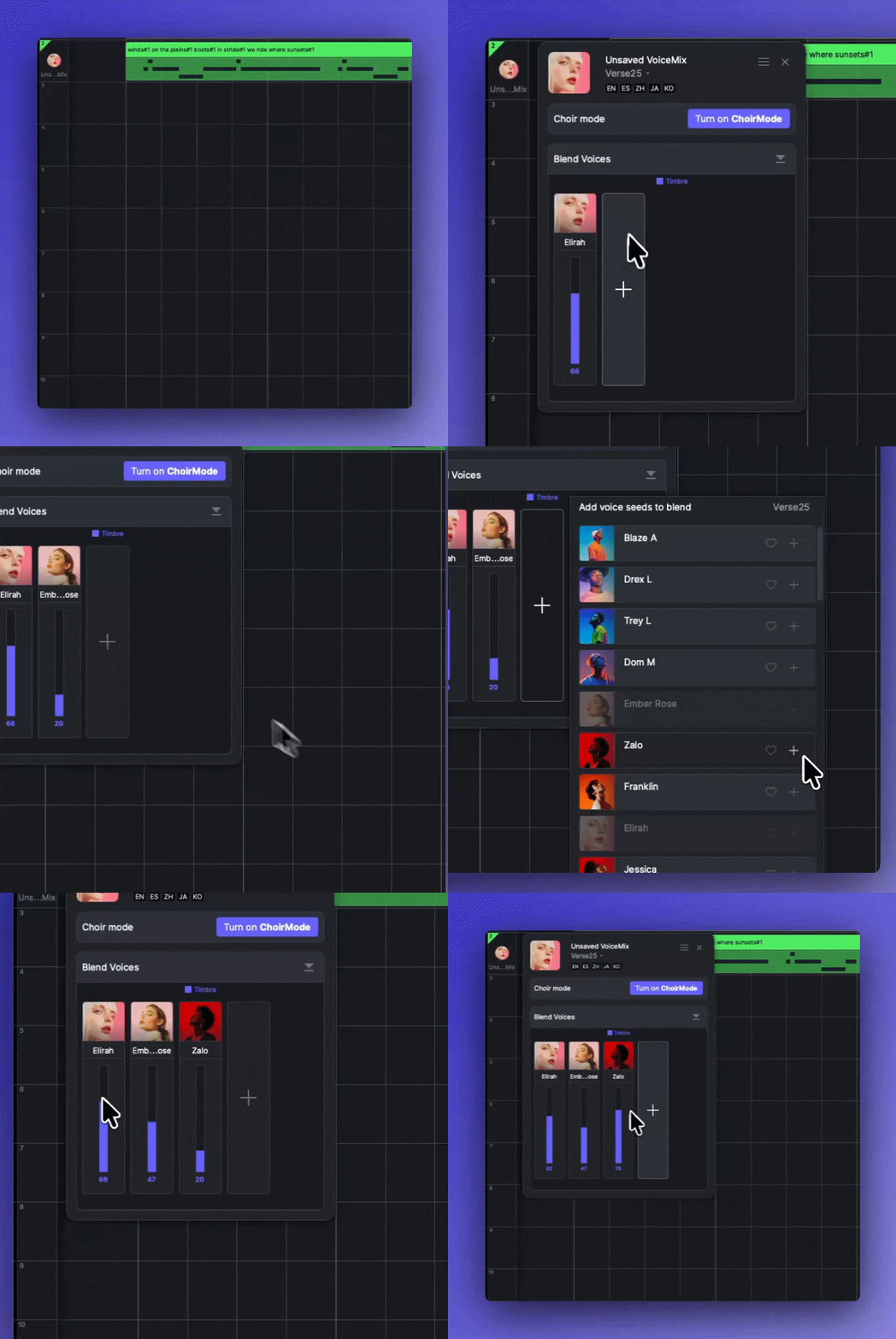
Clique no cabeçalho da faixa para abrir o painel da faixa. Há um módulo chamado "mistura de voz" no painel da faixa.
* Clique no + botão para adicionar diferentes sementes de voz na lista pop-up.
* Ajuste a proporção de mistura arrastando verticalmente cada fader.
* Clique com o botão direito em uma semente para excluí-la ou copiá-la.
* Copie e cole a receita de mistura em outra faixa de cantor usando o menu Configurações no canto superior direito do painel.
{% hint style="info" %}
No Verse24 e em versões anteriores, a mistura envolve duas dimensões separadas: Timbre e Estilo.\
Por padrão, suas proporções são sincronizadas. Você pode desincronizá-las clicando no botão de corrente no centro de cada semente para realizar ajustes independentes.
{% endhint %}
### Misturando vozes no Modo Uníssono
Você pode misturar vozes para cada voz dentro de [Modo Unison para Vocais](https://docs.acestudio.ai/docs/product-wiki-pt/sintetizador-vocal-ia/creating-ai-vocals/unison-mode-for-vocals.md). O **Misturar Vozes** módulo corresponde à voz selecionada na lista de vozes.
---
# Agent Instructions
This documentation is published with GitBook. GitBook is the documentation platform designed so that both humans and AI agents can read, navigate, and reason over technical content effectively. Learn more at gitbook.com.
## Querying This Documentation
If you need additional information that is not directly available in this page, you can query the documentation by asking a question.
Perform an HTTP GET request on the following URL with the `ask` and `goal` query parameters:
```
GET https://docs.acestudio.ai/docs/product-wiki-pt/sintetizador-vocal-ia/creating-ai-vocals/voice-blending.md?ask=&goal=
```
`ask` is the immediate question: it should be specific, self-contained, and written in natural language.
`goal` is what the user is ultimately trying to achieve, the reason they need the answer. Sharing it helps GitBook give you a better, more relevant answer. A goal is most helpful when it describes the outcome the user wants rather than restating the question. For example, with `ask=how do I create an API token`, a goal like `automate deployments from our CI pipeline` lets GitBook tailor the answer to that use case.
The response will contain a direct answer to the question and relevant excerpts and sources from the documentation.
Use this mechanism when the answer is not explicitly present in the current page, you need clarification or additional context, or you want to retrieve related documentation sections.