> For the complete documentation index, see [llms.txt](https://docs.acestudio.ai/llms.txt). Markdown versions of documentation pages are available by appending `.md` to page URLs; this page is available as [Markdown](https://docs.acestudio.ai/docs/product-wiki-pt/ferramentas-de-ia/doubles.md).
# Dobras
Use Dobras para criar um som mais amplo e encorpado.
## O que são Dobras
Na produção Vocal, costumamos gravar mais duas tomadas nas laterais, panoramizadas entre 50% e 100%, com um Vocal principal ou Vocal de harmonia para obter mais largura e corpo.
{% hint style="info" %}
**Por que não duplicar?**
Se apenas duplicar, o conteúdo ficará exatamente igual ao original. Nesse caso, a IA gerará o mesmo resultado de Áudio para o duplicado, o que causaria problemas de Fase.
{% endhint %}
## Criar dobras
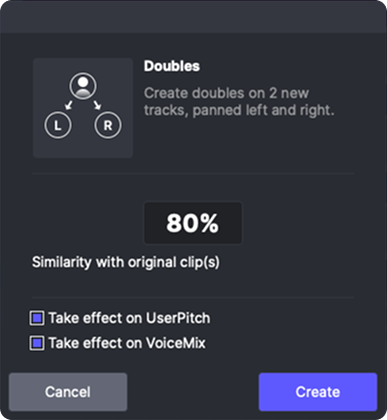
Clique com o botão direito num Clipe MIDI ou no cabeçalho da Faixa e selecione “Criar dobras vocais” no menu de contexto para abrir o painel de Dobras.
No painel de Dobras vocal, pode
* Defina a semelhança com o conteúdo original. 100% representa nenhuma alteração em relação ao original.
* O processo padrão de humanização inclui a Duração: e a posição das notas e a Duração: das consoantes
* 85% - 90% é suficiente para necessidades regulares.
* Se deve aplicar efeitos aleatórios à afinação do utilizador.
* Isto só terá efeito nas curvas de afinação que desenhar. A afinação padrão gerada pela IA não será alterada ao selecionar esta caixa de verificação.
* Se deve aplicar efeitos aleatórios ao VoiceMix.
* Se não tiver usado Vozes Combinadas nesta Faixa, não precisa de marcar esta caixa.
---
# Agent Instructions
This documentation is published with GitBook. GitBook is the documentation platform designed so that both humans and AI agents can read, navigate, and reason over technical content effectively. Learn more at gitbook.com.
## Querying This Documentation
If you need additional information that is not directly available in this page, you can query the documentation by asking a question.
Perform an HTTP GET request on the following URL with the `ask` and `goal` query parameters:
```
GET https://docs.acestudio.ai/docs/product-wiki-pt/ferramentas-de-ia/doubles.md?ask=&goal=
```
`ask` is the immediate question: it should be specific, self-contained, and written in natural language.
`goal` is what the user is ultimately trying to achieve, the reason they need the answer. Sharing it helps GitBook give you a better, more relevant answer. A goal is most helpful when it describes the outcome the user wants rather than restating the question. For example, with `ask=how do I create an API token`, a goal like `automate deployments from our CI pipeline` lets GitBook tailor the answer to that use case.
The response will contain a direct answer to the question and relevant excerpts and sources from the documentation.
Use this mechanism when the answer is not explicitly present in the current page, you need clarification or additional context, or you want to retrieve related documentation sections.