> For the complete documentation index, see [llms.txt](https://docs.acestudio.ai/llms.txt). Markdown versions of documentation pages are available by appending `.md` to page URLs; this page is available as [Markdown](https://docs.acestudio.ai/docs/product-wiki-pt/biblioteca-criativa/song-templates.md).
# Modelos de músicas
Descubra e use modelos de músicas criados pela comunidade.
Os modelos da Biblioteca Criativa são estruturas de músicas pré-definidas criadas pela comunidade, servindo como base para a produção musical. Estes modelos incluem arranjos, instrumentação e outros elementos-chave, permitindo-lhe construir a partir de estruturas já existentes.
## Explorar Modelos
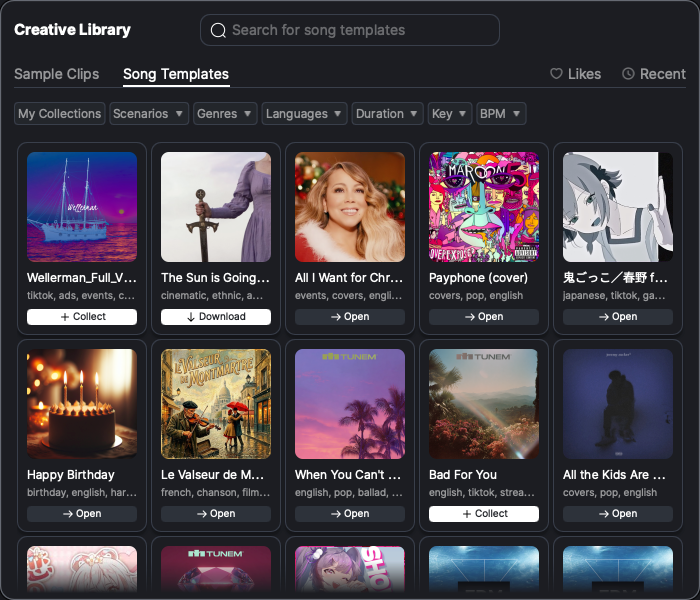
* Clique no ícone da Biblioteca Criativa na barra de ferramentas na parte inferior da janela para abrir o painel da Biblioteca Criativa. Navegue até à Modelos de músicas aba no painel da Biblioteca Criativa.
* Por predefinição, todos os modelos criados pela comunidade são apresentados, ordenados pela sequência da lista da comunidade. Clique na imagem do modelo para pré-visualizar o som do modelo.
* Use a barra de pesquisa para entrar no modo de pesquisa e filtrar modelos com base em vários critérios, incluindo género, Duração:, tonalidade, idioma e BPM.
* Clique em A Minha Coleção para ver apenas os modelos que recolheu.
## Recolher Modelos
* Os modelos não recolhidos são assinalados com um + ícone. Clique em + para adicionar o modelo à sua coleção.
* Os modelos recolhidos, mas não transferidos, são assinalados com um botão Download. Clique no botão para transferir o modelo.
* Clique nos modelos recolhidos e transferidos para carregar diretamente o projeto do modelo.
---
# Agent Instructions
This documentation is published with GitBook. GitBook is the documentation platform designed so that both humans and AI agents can read, navigate, and reason over technical content effectively. Learn more at gitbook.com.
## Querying This Documentation
If you need additional information that is not directly available in this page, you can query the documentation dynamically by asking a question.
Perform an HTTP GET request on the current page URL with the `ask` query parameter, and the optional `goal` query parameter:
```
GET https://docs.acestudio.ai/docs/product-wiki-pt/biblioteca-criativa/song-templates.md?ask=&goal=
```
`ask` is the immediate question: it should be specific, self-contained, and written in natural language.
`goal` is optional and describes the broader end goal you are ultimately trying to accomplish on behalf of the user. GitBook uses it to tailor the answer towards what is most useful for that goal.
The response will contain a direct answer to the question and relevant excerpts and sources from the documentation.
Use this mechanism when the answer is not explicitly present in the current page, you need clarification or additional context, or you want to retrieve related documentation sections.