> For the complete documentation index, see [llms.txt](https://docs.acestudio.ai/llms.txt). Markdown versions of documentation pages are available by appending `.md` to page URLs; this page is available as [Markdown](https://docs.acestudio.ai/docs/product-wiki-pt/biblioteca-criativa/samples.md).
# Amostras
Descubra e use amostras editáveis criadas pela comunidade.
As Amostras da Biblioteca Criativa são clipes vocais/de Instrumento editáveis criados pela comunidade, concebidos para simplificar o processo de produção musical. Cada amostra é um clipe MIDI que inclui Letra, melodia e Parâmetros de IA.
## Navegar pelas Amostras
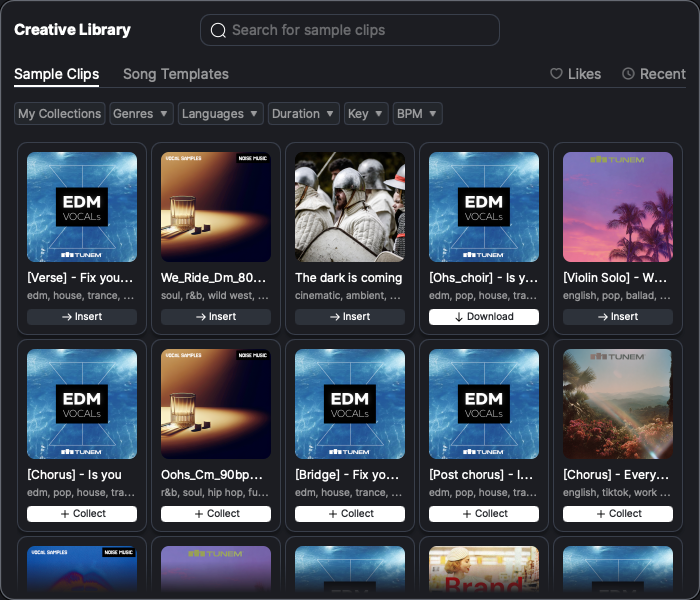
* Clique no ícone da Biblioteca Criativa na barra de ferramentas na parte inferior da janela para abrir o painel da Biblioteca Criativa. Navegue até a Clipes de amostra aba no painel da Biblioteca Criativa.
* Por padrão, todas as amostras criadas pela comunidade são exibidas, ordenadas pela ordem da lista da comunidade. Clique na imagem da amostra para pré-ouvir o som da amostra.
* Use a barra de pesquisa para entrar no modo de pesquisa e filtrar as amostras com base em vários critérios, incluindo gênero, Duração:, tonalidade, idioma e BPM.
* Clique em Minha Coleção para ver apenas as amostras que você coletou.
## Coletar Amostras
* As amostras não coletadas são marcadas com um + ícone. Clique em + para adicionar a amostra à sua coleção.
* As amostras coletadas, mas não baixadas, são marcadas com um botão Download. Clique no botão para baixar a amostra.
* Você pode arrastar as amostras coletadas e baixadas diretamente para o seu Projeto ou clicar nelas para usá-las.
---
# Agent Instructions
This documentation is published with GitBook. GitBook is the documentation platform designed so that both humans and AI agents can read, navigate, and reason over technical content effectively. Learn more at gitbook.com.
## Querying This Documentation
If you need additional information that is not directly available in this page, you can query the documentation by asking a question.
Perform an HTTP GET request on the following URL with the `ask` and `goal` query parameters:
```
GET https://docs.acestudio.ai/docs/product-wiki-pt/biblioteca-criativa/samples.md?ask=&goal=
```
`ask` is the immediate question: it should be specific, self-contained, and written in natural language.
`goal` is what the user is ultimately trying to achieve, the reason they need the answer. Sharing it helps GitBook give you a better, more relevant answer. A goal is most helpful when it describes the outcome the user wants rather than restating the question. For example, with `ask=how do I create an API token`, a goal like `automate deployments from our CI pipeline` lets GitBook tailor the answer to that use case.
The response will contain a direct answer to the question and relevant excerpts and sources from the documentation.
Use this mechanism when the answer is not explicitly present in the current page, you need clarification or additional context, or you want to retrieve related documentation sections.