> For the complete documentation index, see [llms.txt](https://docs.acestudio.ai/llms.txt). Markdown versions of documentation pages are available by appending `.md` to page URLs; this page is available as [Markdown](https://docs.acestudio.ai/docs/product-wiki-ja/le-qi/create-instrument-sounds/articulations.md).
# アーティキュレーション
ACE StudioのAI楽器アーティキュレーションを確認します。
## 演奏法とは何ですか
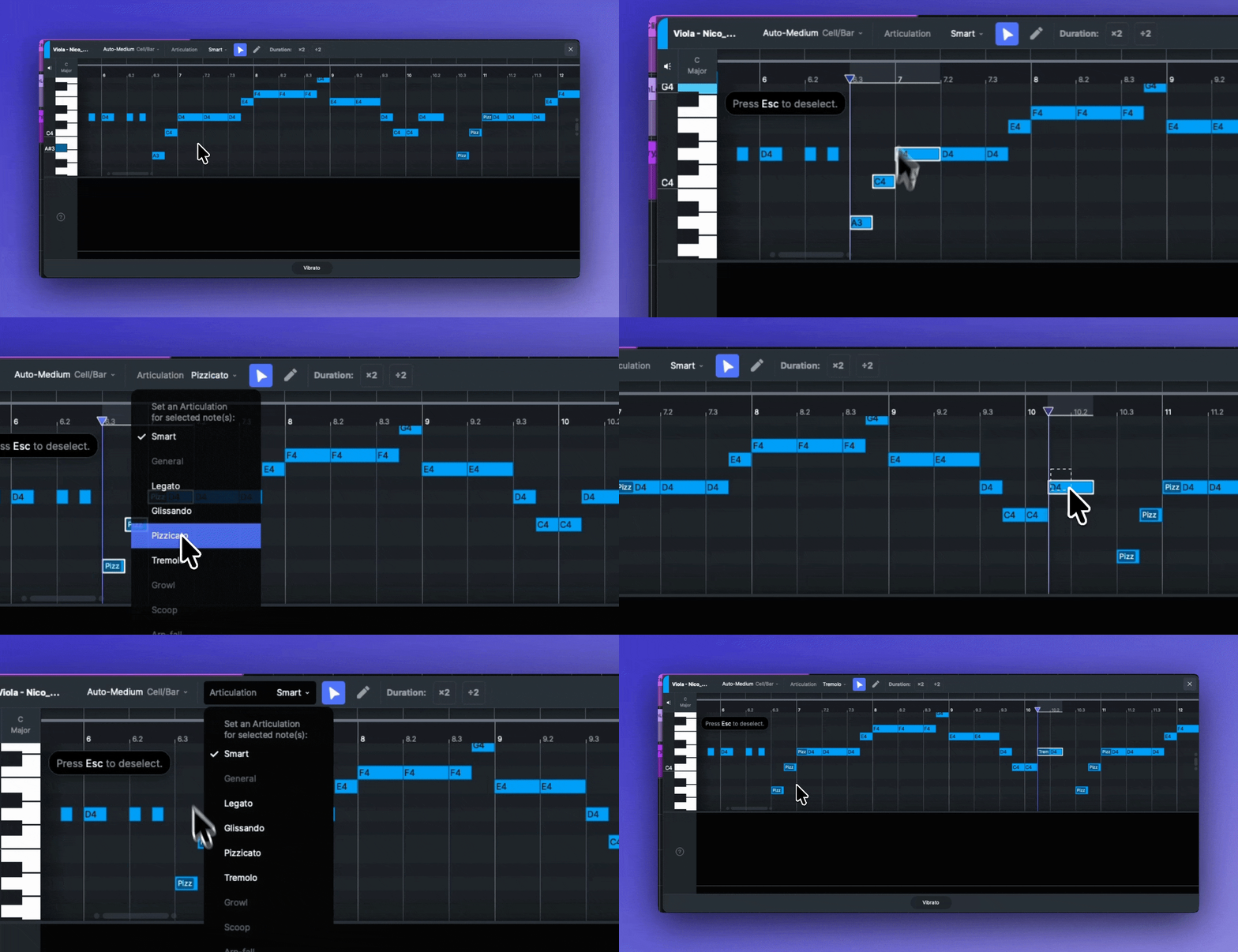
演奏法は、楽器が音を再生するために使えるさまざまなテクニックです。たとえば、バイオリンは、滑らかに弓で奏でる(Legato)か、ストリングスを弾く(Pizzicato)ことで音を再生できます。既定では、AI楽器は **スマート** モードを使用し、メロディーをインテリジェントに分析して最適な演奏法を適用します。ただし、完全な創作コントロールのため、任意の音符に特定の演奏法を手動で割り当てることもできます。
### 利用可能な演奏法
利用可能な演奏法は、楽器によって異なります。
スマート
AIが、音楽的文脈に基づいて最適な演奏法を自動で選択します。
一般
標準的で中立的な演奏スタイル。
レガート
音は滑らかにつながって演奏され、その間に無音はありません。
グリッサンド
1つの音から次の音へ、音程が連続して滑るように移動する奏法です。
ピチカート
ストリングスは、弓ではなく指で弾かれます。
トレモロ
1つの音を非常に速く繰り返し、震えるような効果を生み出します。
グロウル
ざらついた、しゃがれた、または喉を鳴らすような音で、ジャズやロックでよく使われます。
スクープ
やや低い音程から目的の音へと持ち上げる奏法です。
アルペジオ・フォール
主要な音に向かって、急速に下降する音列が落ちていくような演奏です。
ミュート
音が抑えられ、ミュートされて、より柔らかく共鳴の少ない音色になります。
## 演奏法を編集する
1. ピアノロールで、変更したい音符を1つ以上選択します。
2. ツールバーで **「演奏法」** ピアノロールの上にあるドロップダウンメニューを見つけます。
3. リストから希望の演奏法を選択します。
---
# Agent Instructions
This documentation is published with GitBook. GitBook is the documentation platform designed so that both humans and AI agents can read, navigate, and reason over technical content effectively. Learn more at gitbook.com.
## Querying This Documentation
If you need additional information that is not directly available in this page, you can query the documentation by asking a question.
Perform an HTTP GET request on the following URL with the `ask` and `goal` query parameters:
```
GET https://docs.acestudio.ai/docs/product-wiki-ja/le-qi/create-instrument-sounds/articulations.md?ask=&goal=
```
`ask` is the immediate question: it should be specific, self-contained, and written in natural language.
`goal` is what the user is ultimately trying to achieve, the reason they need the answer. Sharing it helps GitBook give you a better, more relevant answer. A goal is most helpful when it describes the outcome the user wants rather than restating the question. For example, with `ask=how do I create an API token`, a goal like `automate deployments from our CI pipeline` lets GitBook tailor the answer to that use case.
The response will contain a direct answer to the question and relevant excerpts and sources from the documentation.
Use this mechanism when the answer is not explicitly present in the current page, you need clarification or additional context, or you want to retrieve related documentation sections.