> For the complete documentation index, see [llms.txt](https://docs.acestudio.ai/llms.txt). Markdown versions of documentation pages are available by appending `.md` to page URLs; this page is available as [Markdown](https://docs.acestudio.ai/docs/product-wiki-ja/kurieitiburaiburari/song-templates.md).
# ソングテンプレート
コミュニティが作成したソングテンプレートを見つけて使用します。
クリエイティブライブラリのテンプレートは、コミュニティが作成したあらかじめ設計された楽曲構成で、音楽制作の土台として利用できます。これらのテンプレートには、アレンジ、編成、その他の主要要素が含まれており、既存のフレームワークを基に制作を進められます。
## テンプレートを参照
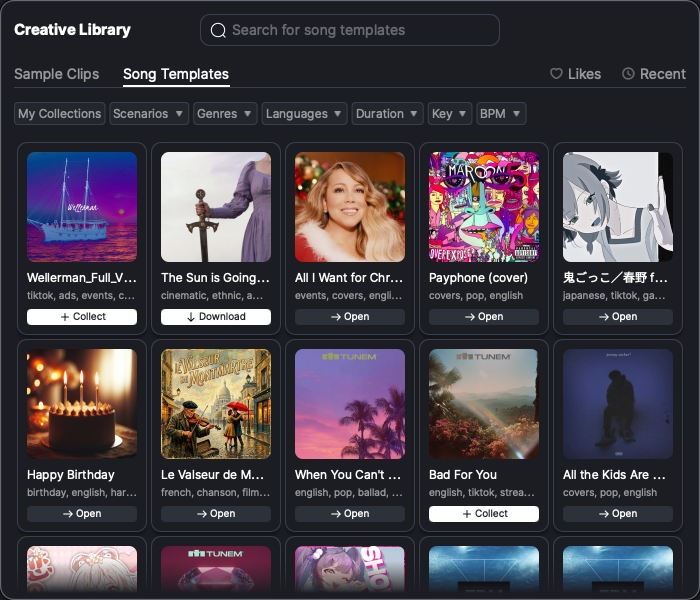
* ウィンドウ下部のツールバーにあるクリエイティブライブラリのアイコンをクリックして、クリエイティブライブラリパネルを開きます。次に、 ソングテンプレート クリエイティブライブラリパネル内のタブです。
* 既定では、コミュニティが作成したすべてのテンプレートが、コミュニティのリスト順に並んで表示されます。テンプレート画像をクリックすると、テンプレートのサウンドをプレビューできます。
* 検索バーを使用して検索モードに入り、ジャンル、音符の長さ、キー、言語、BPM などのさまざまな条件でテンプレートを絞り込めます。
* をクリックして マイコレクション 収集済みのテンプレートのみを表示するには。
## テンプレートを収集
* 未収集のテンプレートには、 + アイコンで示されます。クリックして + テンプレートをコレクションに追加します。
* 収集済みでまだダウンロードされていないテンプレートには、ダウンロードボタンが表示されます。ボタンをクリックしてテンプレートをダウンロードします。
* 収集済みかつダウンロード済みのテンプレートをクリックすると、テンプレートのプロジェクトを直接読み込めます。
---
# Agent Instructions
This documentation is published with GitBook. GitBook is the documentation platform designed so that both humans and AI agents can read, navigate, and reason over technical content effectively. Learn more at gitbook.com.
## Querying This Documentation
If you need additional information that is not directly available in this page, you can query the documentation dynamically by asking a question.
Perform an HTTP GET request on the current page URL with the `ask` query parameter, and the optional `goal` query parameter:
```
GET https://docs.acestudio.ai/docs/product-wiki-ja/kurieitiburaiburari/song-templates.md?ask=&goal=
```
`ask` is the immediate question: it should be specific, self-contained, and written in natural language.
`goal` is optional and describes the broader end goal you are ultimately trying to accomplish on behalf of the user. GitBook uses it to tailor the answer towards what is most useful for that goal.
The response will contain a direct answer to the question and relevant excerpts and sources from the documentation.
Use this mechanism when the answer is not explicitly present in the current page, you need clarification or additional context, or you want to retrieve related documentation sections.