> For the complete documentation index, see [llms.txt](https://docs.acestudio.ai/llms.txt). Markdown versions of documentation pages are available by appending `.md` to page URLs; this page is available as [Markdown](https://docs.acestudio.ai/docs/product-wiki-ja/aitsru/vocal-to-midi.md).
# ボーカルからMIDIへ
包括的なボーカル制作のために、ボーカルトラックを歌詞付きMIDIクリップに変換します。
## 「ボーカルをMIDIに変換」とは
この機能を使用すると、ボーカルトラックを、各音符に歌詞が付いたMIDIクリップに変換できます。
既存のボーカルや録音したばかりのボーカルをもとにボーカル制作を始めたい場合、メロディ、歌詞、シンガー、感情表現を含むボーカルのすべてを編集するための最適なツールです。
## 「ボーカルをMIDIに変換」にアクセスする
ボーカルをMIDIに変換する方法は3つあります:
* オーディオクリップをシンガートラックにドラッグ&ドロップします。
* の左側ツールパネルにある「ボーカルをMIDIに変換」ボタンをクリックします。 [オーディオエディター](/docs/product-wiki-ja/purojekuto/arrangement-in-canvas/clips/clip-editor.md).
* オーディオクリップを右クリックし、「AIツール」オプションから「ボーカルをMIDIに変換」を選択します。
## 変換
### モデルと言語を選択
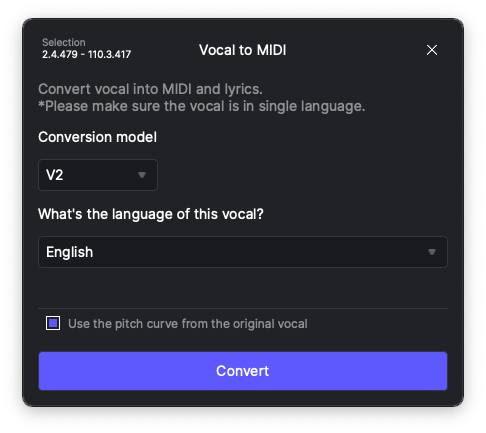
「ボーカルをMIDIに変換」パネルで、まず変換モデルと、コンテンツに合った言語を選択する必要があります。
V1モデルは、英語、スペイン語、中国語、日本語の4言語をサポートする旧バージョンです。このモデルは「歌詞」よりも「音素」を認識する傾向があります。
高度なV2モデルは、韓国語を含むさらに多くの言語をサポートしています。「わからない」を選択すると、モデルに言語を自動検出させることもできます。このモデルは「歌詞」を認識する傾向があります。
### 他言語の処理またはMIDIのみの抽出
他言語のボーカルをMIDIに変換する、または歌詞を除く音符情報のみを抽出するには、「**MIDIのみ**」オプションを言語選択のドロップダウンメニューから選択します。
### 元のピッチを使用
下のチェックボックスをオンにすると、入力ボーカルの元のピッチカーブを保持できます。変換後、元のピッチはクリップ内のユーザーピッチとして適用されます。歌詞を変更した場合は、必ずピッチカーブを削除してください。削除しないと、ピッチが新しい歌詞と一致せず、不自然な発音になる可能性があります。
ピッチカーブの詳細については、以下を参照してください [ピッチの編集](/docs/product-wiki-ja/aibkarushinse/creating-ai-vocals/editing-pitch.md).
{% hint style="info" %}
* この機能は、アカペラのボーカル向けに特別に設計されています。入力にインストゥルメンタルトラック、ディレイエフェクト、またはリバーブエフェクトが含まれている場合、正確な変換は保証されません。
* このコンバーターは、一度に1つの言語のみを解析できます。オーディオに複数の言語が含まれている場合は、「MIDIのみ」オプションを選択するか、オーディオをトラックを選択一で分割して、各言語を個別に処理してください。
{% endhint %}
---
# Agent Instructions
This documentation is published with GitBook. GitBook is the documentation platform designed so that both humans and AI agents can read, navigate, and reason over technical content effectively. Learn more at gitbook.com.
## Querying This Documentation
If you need additional information that is not directly available in this page, you can query the documentation dynamically by asking a question.
Perform an HTTP GET request on the current page URL with the `ask` query parameter, and the optional `goal` query parameter:
```
GET https://docs.acestudio.ai/docs/product-wiki-ja/aitsru/vocal-to-midi.md?ask=&goal=
```
`ask` is the immediate question: it should be specific, self-contained, and written in natural language.
`goal` is optional and describes the broader end goal you are ultimately trying to accomplish on behalf of the user. GitBook uses it to tailor the answer towards what is most useful for that goal.
The response will contain a direct answer to the question and relevant excerpts and sources from the documentation.
Use this mechanism when the answer is not explicitly present in the current page, you need clarification or additional context, or you want to retrieve related documentation sections.