> For the complete documentation index, see [llms.txt](https://docs.acestudio.ai/llms.txt). Markdown versions of documentation pages are available by appending `.md` to page URLs; this page is available as [Markdown](https://docs.acestudio.ai/docs/product-wiki-ja/aitsru/music-enhancer.md).
# Music Enhancer
AIガイドによる変換を使用して、ACE Studio内の選択したオーディオを再解釈・強化します。
## ミュージックエンハンサーとは
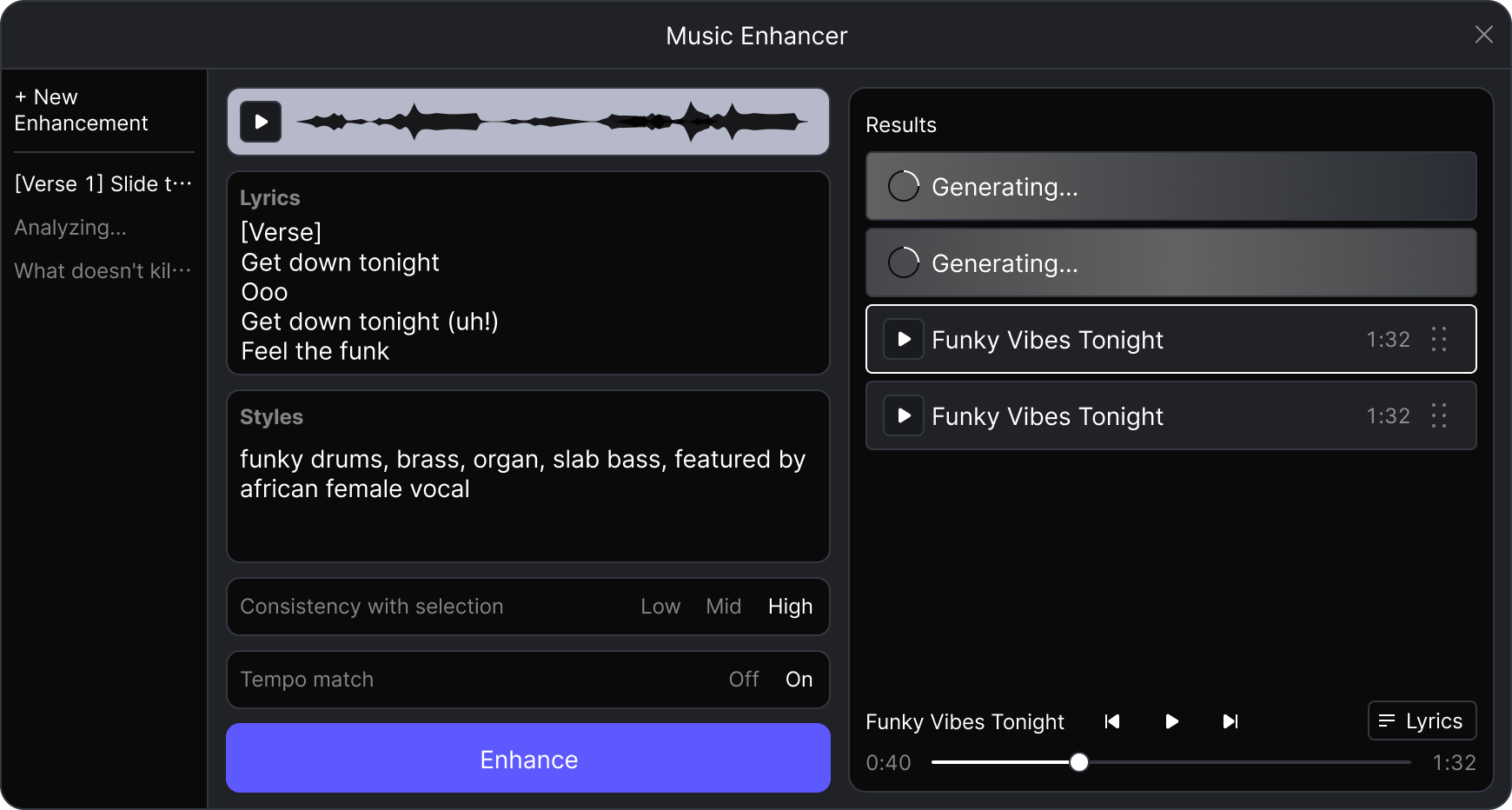
ミュージックエンハンサーは、AIを使って既存の楽曲を再解釈するクリエイティブなツールです。キャンバス上に選択ボックスを描くことで、その選択範囲内のすべてのオーディオを強化版へ変換できます。
## ミュージックエンハンサーの使い方
「 **ミュージックエンハンサー** ツールバーのボタンをクリックして、生成ウィンドウを開きます。
### 強化内容を定義する
1. まず、強化したいオーディオをキャンバス上で直接選択する必要があります。ツールは **すべてのオーディオコンテンツ** を処理します。
2. 続行すると、ツールは自動的に **歌詞** (該当する場合)と元のオーディオの音楽 **スタイル** を解析します。
3. 新しいバージョンのイメージを説明するために、 **スタイル** ボックス内のテキストを手動で変更できます。たとえば、「ファンキーなドラム、ブラス、オルガン」を「シンフォニック・オーケストラ、壮大な合唱、シネマティックなストリングス」に変更できます。また、必要に応じて **歌詞** も編集できます。
4. 次を使用して **選択範囲との整合性** スライダーで、新しいトラックが元のオーディオにどれだけ忠実に従うかを調整します。
5. クリック エンハンス して、作成プロセスを開始します。
### 強化セッションの管理
すべての強化済みセッションとトラックは、アカウントに保存されます。左パネルから新しい強化を開始するか、セッションにアクセスしてください。結果パネルで強化済みトラックを表示できます。
* **ダウンロード**: 完了すると、トラックは使用可能な状態になります。 :download: ダウンロードボタンをクリックするだけで、オーディオを利用できるようになります。
* **プレビュー**: ちょっと試聴するには、 :play: ボタンをクリックして、作成に使用された詳細を表示できます。
* **キャンバスに追加**: トラックをそのままキャンバスへドラッグするだけです。
---
# Agent Instructions
This documentation is published with GitBook. GitBook is the documentation platform designed so that both humans and AI agents can read, navigate, and reason over technical content effectively. Learn more at gitbook.com.
## Querying This Documentation
If you need additional information that is not directly available in this page, you can query the documentation dynamically by asking a question.
Perform an HTTP GET request on the current page URL with the `ask` query parameter, and the optional `goal` query parameter:
```
GET https://docs.acestudio.ai/docs/product-wiki-ja/aitsru/music-enhancer.md?ask=&goal=
```
`ask` is the immediate question: it should be specific, self-contained, and written in natural language.
`goal` is optional and describes the broader end goal you are ultimately trying to accomplish on behalf of the user. GitBook uses it to tailor the answer towards what is most useful for that goal.
The response will contain a direct answer to the question and relevant excerpts and sources from the documentation.
Use this mechanism when the answer is not explicitly present in the current page, you need clarification or additional context, or you want to retrieve related documentation sections.