> For the complete documentation index, see [llms.txt](https://docs.acestudio.ai/llms.txt). Markdown versions of documentation pages are available by appending `.md` to page URLs; this page is available as [Markdown](https://docs.acestudio.ai/docs/product-wiki-ja/aitsru/doubles.md).
# ダブル
ダブルを使用して、よりワイドで豊かなサウンドを作成します。
## ダブルとは
ボーカル制作では、より広い奥行きと厚みを出すために、通常はリードボーカルまたはハーモニーボーカルに対して、左右50%〜100%の範囲でパンした追加のテイクを2本録音します。
{% hint style="info" %}
**なぜ複製しないのか?**
単純に複製すると、内容は元のものとまったく同じになります。この場合、AIは複製したものに対して同じオーディオ結果を生成するため、位相問題が発生します。
{% endhint %}
## ダブルを作成
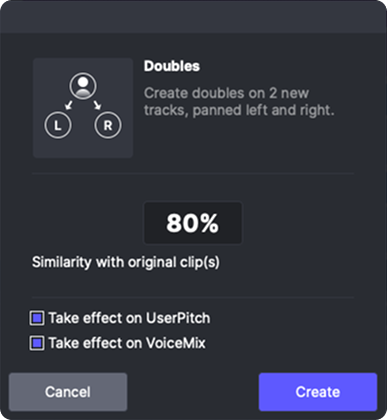
MIDIクリップまたはトラックヘッドを右クリックし、右クリックメニューで「ボーカルのダブルを作成」を選択すると、ダブルパネルが開きます。
ボーカルダブルパネルでは、次のことができます。
* 元の内容との類似度を設定します。100%は元のものに変更がないことを意味します。
* デフォルトのヒューマナイズ処理には、音符の長さと位置、および子音の音符の長さが含まれます
* 85%〜90%で通常の用途には十分です。
* ユーザーピッチにランダム効果を適用するかどうか。
* これは、あなたが描いたピッチカーブにのみ反映されます。このチェックボックスを選択しても、AIが生成したデフォルトピッチは変更されません。
* VoiceMixにランダム効果を適用するかどうか。
* このトラックでブレンドされたボイスを使用していない場合は、このチェックボックスをオンにする必要はありません。
---
# Agent Instructions
This documentation is published with GitBook. GitBook is the documentation platform designed so that both humans and AI agents can read, navigate, and reason over technical content effectively. Learn more at gitbook.com.
## Querying This Documentation
If you need additional information that is not directly available in this page, you can query the documentation dynamically by asking a question.
Perform an HTTP GET request on the current page URL with the `ask` query parameter, and the optional `goal` query parameter:
```
GET https://docs.acestudio.ai/docs/product-wiki-ja/aitsru/doubles.md?ask=&goal=
```
`ask` is the immediate question: it should be specific, self-contained, and written in natural language.
`goal` is optional and describes the broader end goal you are ultimately trying to accomplish on behalf of the user. GitBook uses it to tailor the answer towards what is most useful for that goal.
The response will contain a direct answer to the question and relevant excerpts and sources from the documentation.
Use this mechanism when the answer is not explicitly present in the current page, you need clarification or additional context, or you want to retrieve related documentation sections.