> For the complete documentation index, see [llms.txt](https://docs.acestudio.ai/llms.txt). Markdown versions of documentation pages are available by appending `.md` to page URLs; this page is available as [Markdown](https://docs.acestudio.ai/docs/product-wiki-ja/aitsru/add-a-layer.md).
# レイヤーを追加
レイヤータイプを選択し、求めるスタイルを説明して、ACE Studioで新しい音楽レイヤーを生成します。
## 『レイヤーを追加』とは何か
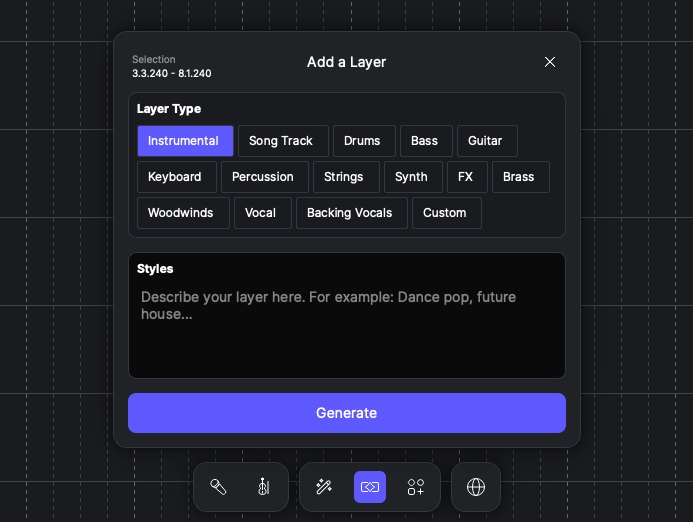
『レイヤーを追加』は、キャンバス上で直接新しいオーディオレイヤーを生成するAIツールです。スタイルを指定すると、プロジェクトにぴったり合う音楽レイヤーを作成できます。
## 『レイヤーを追加』の使い方
### 範囲を選択
1. キャンバス上をクリックしてドラッグし、時間範囲を作成します。
2. この選択範囲が、新しいレイヤーの開始時刻と長さを決定します。
3. 開く **レイヤーを追加** ツールバーから。
### レイヤーを生成
1. 生成したいレイヤーの種類を選択します。
2. で **スタイル**、希望するサウンドの短い説明を入力します。
3. 選択した場合 **ソングトラック**, **ボーカル**、または **バックボーカル**、歌詞も入力できます。
4. 選択した場合 **カスタム**、希望する楽器を入力できます。
5. クリック 生成 処理を開始します。AI がプロジェクトを分析し、まったく新しい、プロジェクトに合った音楽レイヤーを生成します。
---
# Agent Instructions
This documentation is published with GitBook. GitBook is the documentation platform designed so that both humans and AI agents can read, navigate, and reason over technical content effectively. Learn more at gitbook.com.
## Querying This Documentation
If you need additional information that is not directly available in this page, you can query the documentation dynamically by asking a question.
Perform an HTTP GET request on the current page URL with the `ask` query parameter, and the optional `goal` query parameter:
```
GET https://docs.acestudio.ai/docs/product-wiki-ja/aitsru/add-a-layer.md?ask=&goal=
```
`ask` is the immediate question: it should be specific, self-contained, and written in natural language.
`goal` is optional and describes the broader end goal you are ultimately trying to accomplish on behalf of the user. GitBook uses it to tailor the answer towards what is most useful for that goal.
The response will contain a direct answer to the question and relevant excerpts and sources from the documentation.
Use this mechanism when the answer is not explicitly present in the current page, you need clarification or additional context, or you want to retrieve related documentation sections.