> For the complete documentation index, see [llms.txt](https://docs.acestudio.ai/llms.txt). Markdown versions of documentation pages are available by appending `.md` to page URLs; this page is available as [Markdown](https://docs.acestudio.ai/docs/product-wiki-ja/aibkarushinse/creating-ai-vocals/voice-blending.md).
# ボイスブレンディング
複数のAIボイスシードをブレンドし、ACE Studioで独自のハイブリッドボイスを作成します。
## ボイスブレンディングとは?
この機能を使うと、AIで異なるボイスをブレンドして、ハイブリッドシンガーを作成できます。
ボイスブレンディングでは、同じボーカルシンセモデルバージョンで複数のシンガーシードを組み合わせられます。
カスタマイズしたブレンド済みプリセットをシンガーライブラリに手動で保存できます。
ブレンド済みプリセットを使用するには、キャンバスまたはトラックヘッダーへドラッグするだけです。
## ボイスミックス
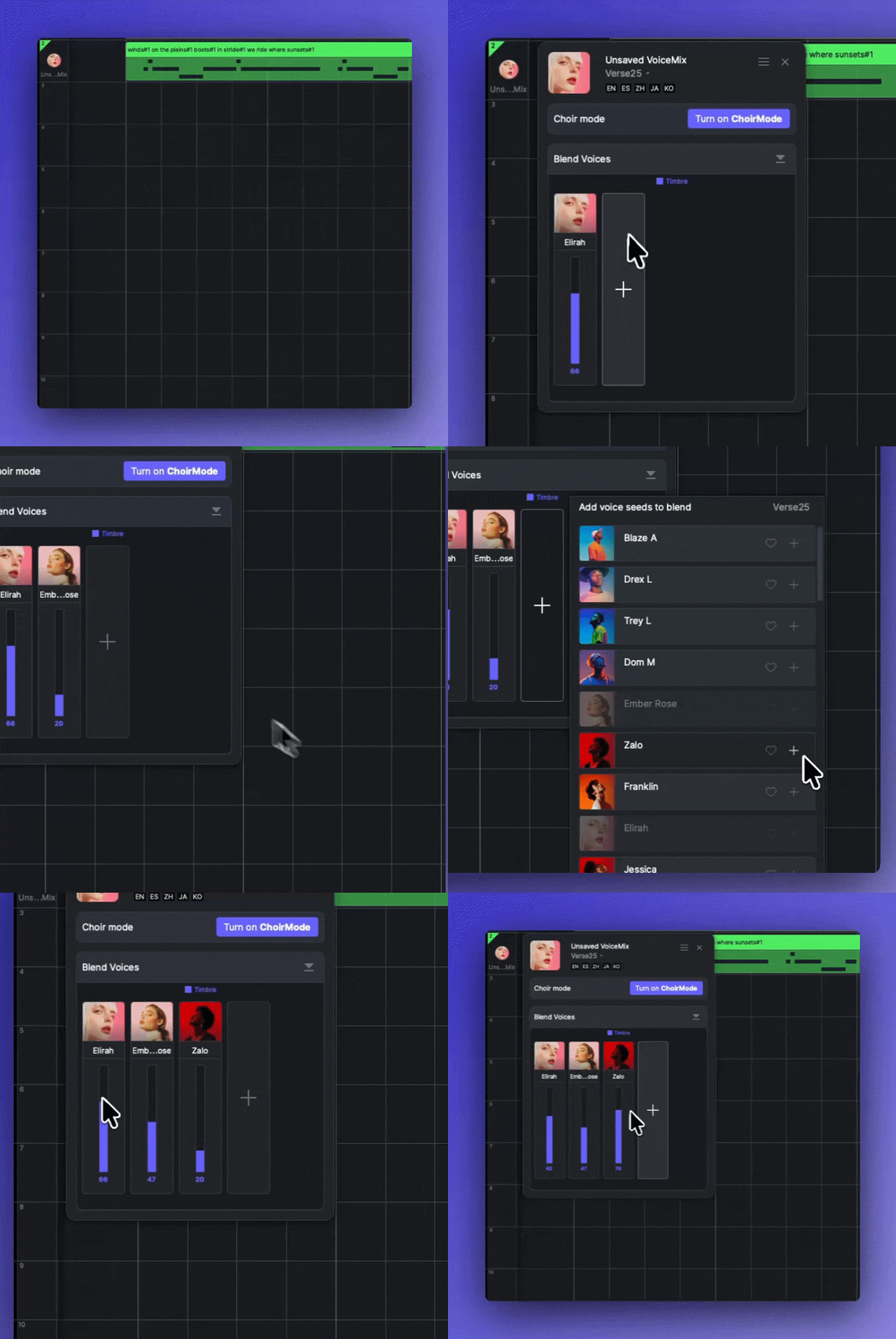
トラックヘッダーをクリックしてトラックパネルを開きます。トラックパネルには「ボイスミックス」というモジュールがあります。
* 「 + ポップアップリストから異なるシンガーシードを追加するためのボタン。
* 各フェーダーを上下にドラッグして、ブレンド比率を調整します。
* シードを右クリックして削除またはコピーします。
* パネル右上の設定メニューを使って、ブレンドレシピを別のシンガートラックにコピーして貼り付けます。
{% hint style="info" %}
Verse24以前では、ブレンドには「声質」と「スタイル」という2つの独立した次元があります。\
デフォルトでは、それぞれの比率は同期されています。各シード中央のチェーンボタンをクリックすると同期を解除でき、個別に調整できます。
{% endhint %}
### ユニゾンモードでのボイスミックス
内の各シンガーごとにボイスミックスできます [ボーカルのユニゾンモード](/docs/product-wiki-ja/aibkarushinse/creating-ai-vocals/unison-mode-for-vocals.md)。その **ボイスミックス** モジュールは、シンガーリストで選択したシンガーに対応します。
---
# Agent Instructions
This documentation is published with GitBook. GitBook is the documentation platform designed so that both humans and AI agents can read, navigate, and reason over technical content effectively. Learn more at gitbook.com.
## Querying This Documentation
If you need additional information that is not directly available in this page, you can query the documentation by asking a question.
Perform an HTTP GET request on the following URL with the `ask` and `goal` query parameters:
```
GET https://docs.acestudio.ai/docs/product-wiki-ja/aibkarushinse/creating-ai-vocals/voice-blending.md?ask=&goal=
```
`ask` is the immediate question: it should be specific, self-contained, and written in natural language.
`goal` is what the user is ultimately trying to achieve, the reason they need the answer. Sharing it helps GitBook give you a better, more relevant answer. A goal is most helpful when it describes the outcome the user wants rather than restating the question. For example, with `ask=how do I create an API token`, a goal like `automate deployments from our CI pipeline` lets GitBook tailor the answer to that use case.
The response will contain a direct answer to the question and relevant excerpts and sources from the documentation.
Use this mechanism when the answer is not explicitly present in the current page, you need clarification or additional context, or you want to retrieve related documentation sections.