> For the complete documentation index, see [llms.txt](https://docs.acestudio.ai/llms.txt). Markdown versions of documentation pages are available by appending `.md` to page URLs; this page is available as [Markdown](https://docs.acestudio.ai/docs/product-wiki-it/biblioteca-creativa/song-templates.md).
# Modelli di canzoni
Scopri e usa modelli di canzoni creati dalla community.
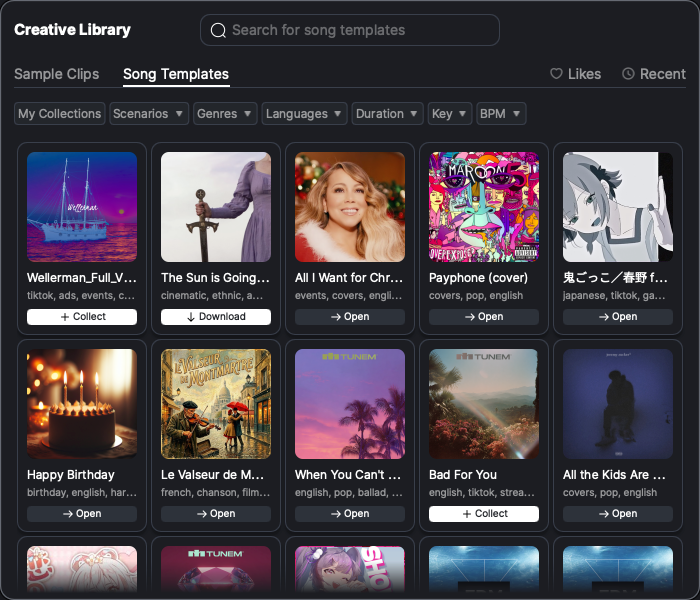
I modelli della Biblioteca Creativa sono strutture di brano predefinite create dalla community, che fungono da base per la produzione musicale. Questi modelli includono arrangiamenti, strumentazione e altri elementi chiave, consentendoti di partire da strutture già esistenti.
## Esplora i modelli
* Fai clic sull'icona di Biblioteca Creativa sulla barra degli strumenti in basso nella finestra per aprire il pannello Biblioteca Creativa. Vai alla Modelli de brano scheda nel pannello Biblioteca Creativa.
* Per impostazione predefinita, vengono visualizzati tutti i modelli creati dalla community, ordinati secondo l'ordine dell'elenco della community. Fai clic sull'immagine del modello per ascoltarne l'anteprima sonora.
* Usa la barra di ricerca per entrare in modalità ricerca e filtrare i modelli in base a vari criteri, tra cui genere, Durata:, tonalità, lingua e BPM.
* Fai clic su La mia raccolta per visualizzare solo i modelli che hai raccolto.
## Raccogli i modelli
* I modelli non raccolti sono contrassegnati da un + icona. Fai clic su + per aggiungere il modello alla tua raccolta.
* I modelli raccolti ma non scaricati sono contrassegnati da un pulsante Download. Fai clic sul pulsante per scaricare il modello.
* Fai clic sui modelli raccolti e scaricati per caricare direttamente il Progetto del modello.
---
# Agent Instructions
This documentation is published with GitBook. GitBook is the documentation platform designed so that both humans and AI agents can read, navigate, and reason over technical content effectively. Learn more at gitbook.com.
## Querying This Documentation
If you need additional information that is not directly available in this page, you can query the documentation by asking a question.
Perform an HTTP GET request on the following URL with the `ask` and `goal` query parameters:
```
GET https://docs.acestudio.ai/docs/product-wiki-it/biblioteca-creativa/song-templates.md?ask=&goal=
```
`ask` is the immediate question: it should be specific, self-contained, and written in natural language.
`goal` is what the user is ultimately trying to achieve, the reason they need the answer. Sharing it helps GitBook give you a better, more relevant answer. A goal is most helpful when it describes the outcome the user wants rather than restating the question. For example, with `ask=how do I create an API token`, a goal like `automate deployments from our CI pipeline` lets GitBook tailor the answer to that use case.
The response will contain a direct answer to the question and relevant excerpts and sources from the documentation.
Use this mechanism when the answer is not explicitly present in the current page, you need clarification or additional context, or you want to retrieve related documentation sections.