> For the complete documentation index, see [llms.txt](https://docs.acestudio.ai/llms.txt). Markdown versions of documentation pages are available by appending `.md` to page URLs; this page is available as [Markdown](https://docs.acestudio.ai/docs/product-wiki-es/biblioteca-creativa/samples.md).
# Muestras
Descubre y usa muestras editables creadas por la comunidad.
Las Muestras de la Biblioteca Creativa son clips vocales/instrumentales editables creados por la comunidad, diseñados para agilizar el proceso de producción musical. Cada muestra es un Clip MIDI que incluye Letras, melodía y Parámetros de IA.
## Explorar muestras
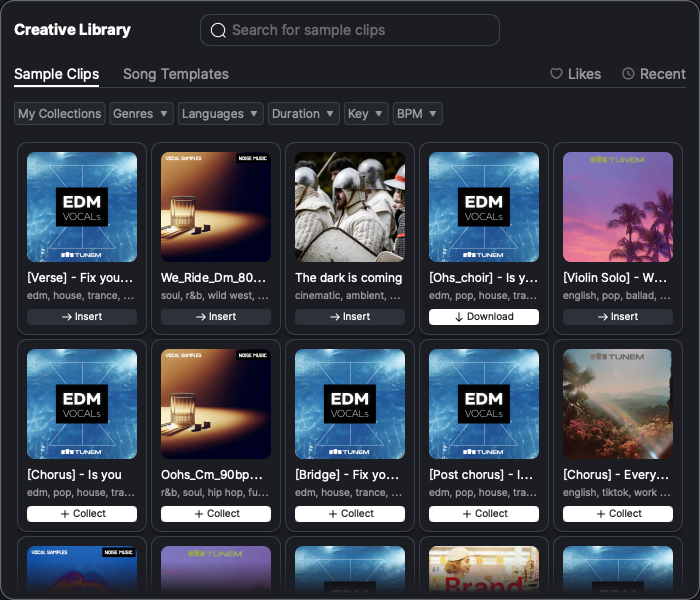
* Haz clic en el icono de la Biblioteca Creativa de la barra de herramientas en la parte inferior de la ventana para abrir el panel de la Biblioteca Creativa. Navega hasta la Clips de muestra pestaña del panel de la Biblioteca Creativa.
* De forma predeterminada, se muestran todas las muestras creadas por la comunidad, ordenadas según el orden de la lista de la comunidad. Haz clic en la imagen de la muestra para preescuchar el sonido de la muestra.
* Usa la barra de búsqueda para entrar en el modo de búsqueda y filtrar las muestras según distintos criterios, incluidos género, Duración:, tonalidad, idioma y BPM.
* Haz clic en Mi colección para ver solo las muestras que has añadido a tu colección.
## Recopilar muestras
* Las muestras no recopiladas se marcan con un + icono. Haz clic en + para añadir la muestra a tu colección.
* Las muestras recopiladas pero no descargadas se marcan con un botón de descarga. Haz clic en el botón para descargar la muestra.
* Puedes arrastrar las muestras recopiladas y descargadas directamente a tu Proyecto o hacer clic en ellas para usarlas.
---
# Agent Instructions
This documentation is published with GitBook. GitBook is the documentation platform designed so that both humans and AI agents can read, navigate, and reason over technical content effectively. Learn more at gitbook.com.
## Querying This Documentation
If you need additional information that is not directly available in this page, you can query the documentation by asking a question.
Perform an HTTP GET request on the following URL with the `ask` and `goal` query parameters:
```
GET https://docs.acestudio.ai/docs/product-wiki-es/biblioteca-creativa/samples.md?ask=&goal=
```
`ask` is the immediate question: it should be specific, self-contained, and written in natural language.
`goal` is what the user is ultimately trying to achieve, the reason they need the answer. Sharing it helps GitBook give you a better, more relevant answer. A goal is most helpful when it describes the outcome the user wants rather than restating the question. For example, with `ask=how do I create an API token`, a goal like `automate deployments from our CI pipeline` lets GitBook tailor the answer to that use case.
The response will contain a direct answer to the question and relevant excerpts and sources from the documentation.
Use this mechanism when the answer is not explicitly present in the current page, you need clarification or additional context, or you want to retrieve related documentation sections.